
Local Marketing Playbook · Rev 1.0
We run the algorithms.
You run the block.
Every dollar of paid search, paid social, email and organic posting is operated by Marketing HQ. Your job starts where an ad account can't reach — the mailbox, the billboard, the truck door, the jobsite fence, the neighbor who asks for a referral at the little-league game.
One install should generate the next three.
Nothing here has to happen in order. This is the whole portal in one place so you can find the thing you need today without hunting for it.
READOUT NOTICE — Partner name, territory, saved-design counts and map geometry on this prototype are labelled sample data for demonstration. Cost and lead-time bands in the playbook are typical US market ranges for the channel, not Studio Home performance claims. Any duration shown is how far ahead a vendor needs your order — never a deadline or a required order of work.
02 · Division of Labor
The line of scrimmage
There is exactly one rule for deciding who owns a marketing job: if it runs on a screen from an account, it is ours. If it runs on paper, asphalt, airwaves, or a handshake, it is yours. This is not a permission structure — it's a resource decision. HQ can never be in your county. You can never be in our ad platform stack.
| Function | What HQ does |
|---|---|
| Paid search | Google & Bing accounts, national + geo-weighted to open territories |
| Paid social | Meta, Pinterest, YouTube — creative, budget, testing, retargeting |
| Organic social | All @studiohome handles, content calendar, community management |
| Nurture sequences, saved-design follow-up, newsletter | |
| Design Center | 3D configurator, pricing engine, saved-design capture |
| Lead routing | CRM, assignment to your territory, consultation booking |
| Brand system | Logos, type, photography direction, product tech docs |
| Function | What you do |
|---|---|
| Direct mail | EDDM carrier routes and targeted lists around your builds |
| Outdoor | Billboards, bulletins, transit, jobsite fence banners |
| Broadcast | Local radio reads, cable/OTA spots, home-improvement shows |
| Local print | Neighborhood magazines, coupon packs, HOA newsletters |
| Fleet & wearables | Truck livery, yard signs, shirts, hats, stickers |
| Listings | Your Google Business Profile and Yelp page, reviews, photos |
| Community | Nextdoor answers, local groups, sponsorships, home shows |
| Photography | Every completed build, shot to spec, sent back to HQ |
HQ-only zone
These are not "not yet." They are not on the roadmap and there is no support queue behind them. If a homeowner found you on a screen, we sent them.
Ask us for anything else. Not these.
| Partner-run Google Ads / Bing accounts | HQ only |
| Partner-run Meta / TikTok ad accounts | HQ only |
| Story & Reel templates | Not issued |
| Paid-social ad creative templates | Not issued |
| Display / programmatic banner sets | Not issued |
| Branded local social handles | Not permitted |
| Partner email blasts to HQ lists | HQ only |
This is the question every good partner asks, and it deserves a straight answer. It is not about trust and it is not about control. It is arithmetic.
We would be bidding against ourselves
Marketing HQ is already buying your territory on the same keywords, to the same homeowners. A second Studio Home account in the auction does not add reach — it bids the price up against the first one. Both sides pay more for clicks we were already going to win, and the lead that arrives can no longer be attributed to either of us. We would be spending two budgets to buy one customer.
A small daily budget burns off before it can learn
Paid platforms optimise on volume. National campaigns run enough conversions each week to teach the algorithm who is worth showing an ad to, and a team watches them daily. A single-territory budget is spent by mid-morning, never reaches the volume the system needs to learn from, and gets scored as a weak account — which raises your costs again. It is not a small version of what HQ does. It is a different, worse thing.
The same money goes further on the ground
A wrapped truck is bought once and works for five years. A fence banner is seen for two hours by families who own the exact lots you want. A mailer around a finished build lands where a neighbour has already seen the work. None of that is auctioned against you, none of it resets tomorrow morning, and none of it is something Marketing HQ can do from a screen. Put the budget where you have the advantage.
Each side plays its own strength. Marketing HQ has the algorithm, the spend volume and the people to watch it hourly. You have the pavement, the relationships and a face in the neighbourhood — the things no ad account can buy. Split that way, both halves compound. Split any other way, they cancel.
Everything above is what each side owns. This is the short list of ways a local marketing decision goes wrong — most of them expensive, three of them legal. None of it is bureaucracy: each one exists because it already happened somewhere.
03 · Local Marketing Opportunities
Everything you can do locally, sorted by kind.
Thirty opportunities across six kinds, twenty-two plays that partners almost never run, and the deep how-to guides sitting behind them. This is a menu, not a schedule — nothing here has to happen before anything else, and nothing expires. Open whichever one fits the work already in front of you.
One install should generate the next three.
04 · Design Center Signal Map
Every saved design in your radius, pinned
When a homeowner configures a Summit, Aspect or Portland in the Design Center and saves it, that design lands in your territory feed with the model, the option set, the configured price band and the ZIP. This is the part no competitor can hand a contractor: a map of households who have already drawn their building.
SAMPLE FEED · schematic sector grid, not geographic
Reading the field is not the point — buying against it is. Ten minutes here replaces a $2,000 demographic study, and every one of these is a channel you already own.
Mail the hot carrier routes
Aggregate social proof only — “dozens of homeowners in this area are designing right now.” Never individual-level data, never a name.
Direct mail how-to →Buy the board on the road in
Find the commute that feeds the hot subdivision and price a digital face on it for a few hundred dollars before committing to a bulletin.
Billboards how-to →Pitch the magazine that covers it
The HOA glossy serving that subdivision reaches the same households on paper, and a Neighbour Project Spotlight costs less than the board.
Local print how-to →Aggregate only. This map exists so you can choose a route, a road and a publication. It is not a contact list. Outreach to a named household happens through CRM assignment, never off this screen.
- Cluster before you drive. Look for three or more pins inside one carrier route — that route is your next EDDM drop, not a guess.
- Match the mailer to the model. A ZIP dense with Aspect saves gets the ADU/rental-income mailer; Summit-heavy ZIPs get the studio/office message.
- Sign the neighbors. When you close a build, the pins within a half mile are your yard-sign and door-hanger list.
- Never cold-call a pin. Saved designs are HQ-nurtured leads. Outreach to a named contact happens through the CRM assignment, not off this map.
- Use it to buy media. Pin density is the only defensible input you have for choosing a billboard face or a radio daypart.
- Feed it back. Every event, mailer and spot you run gets logged so HQ can see which ZIPs lit up after.
05 · Product Resources
Every model, every document, one page
The ADU collection with its full document set: a product guide with the architectural styles, technical specifications for every configuration, and the colour schemes. Each thumbnail is that PDF’s own first page, and each link goes to the live file on the Studio Home CDN — so you always download the current revision rather than a copy that went stale in here.
Never quote from memory. Open the spec.
One product fact worth leading with: these are flat-packed panelised kits, delivered and built on site. No crane. A great many homeowners quietly dread a crane over their roof, their fence and the neighbour’s driveway — and most competitors need one. Saying plainly that you do not removes the objection before it is raised.
These are sales and specification documents, not permit sets. Stamped drawings, foundation details and permit plan sets come from the Asset Vault, by model and by region. Never hand a homeowner a technical specification and let them believe it is a submittable drawing.
06 · Local Business Listings
The three profiles you own outright
None of these is an ad account, so all three are yours to run. They are the only digital surfaces in this playbook where HQ cannot act for you — nobody at head office can post your project photos, answer your reviews or verify your address. Every link below was checked against the live help centre.
Claim all three. Feed the first one weekly.
Google moves these panels around. These are the screens as they are today, so you can recognise the right one before you start editing rather than hunting through menus.
- Registering it under the brand name. HQ holds all brand IP. Claim under your legal entity with the approved partner descriptor.
- Buying, gating or incentivising reviews. The FTC and Google both penalise it, and the penalty lands on the brand listing, not just yours.
- Buying Yelp or Houzz advertising without sign-off. Paid placement on these collides with the national buy and splits attribution.
Listings are the front door. Three other parts of the playbook feed them.
Wording for the good, the unfair and the legal-threat ones.
The photos every one of these profiles runs on.
Working through listings as a tickable procedure.
07 · Replies & De-escalation
What to type when someone is unhappy in public
This covers your Google Business Profile, Yelp, Nextdoor, neighbourhood groups, and any local thread your name turns up in. Brand-account social is handled by HQ — if you see something there, forward it to us rather than replying. Most angry customers want to be heard first and fixed second; solving in the reverse order is how a fixable problem becomes a one-star review.
- Acknowledge what they said.
- Apologise for the experience — not for liability.
- Act — say what you are doing about it.
- Advance — take it offline with a name and a time.
Let them finish. Repeat back what you heard. Ask “what would make this right for you?” before you propose anything. Give a concrete next step with a date, then follow up in writing.
Product-defect claims · safety · legal threats · anything a reporter asks. Screenshot it, send it, stop posting on the thread.
Square brackets are the only thing you change. Copy takes the text to your clipboard so you can paste it straight into the platform.
08 · Signage Standards
Everything with your name on it, read at speed
A sign is read by someone who is not looking for you, from further away than you think, usually while moving. That single fact decides the size of the type, the number of words, and the colour pairing — long before anyone opens a design file. Sizes and materials below are the trade-standard stock every printer already runs.
If it cannot be read in three seconds, it is decoration.
Each face is drawn at its true proportion, with the dashed line marking the safe area and the solid bar showing the minimum cap height at that same proportion. Diagrams are not on a shared scale with each other — a bulletin is not really the size of a yard sign.
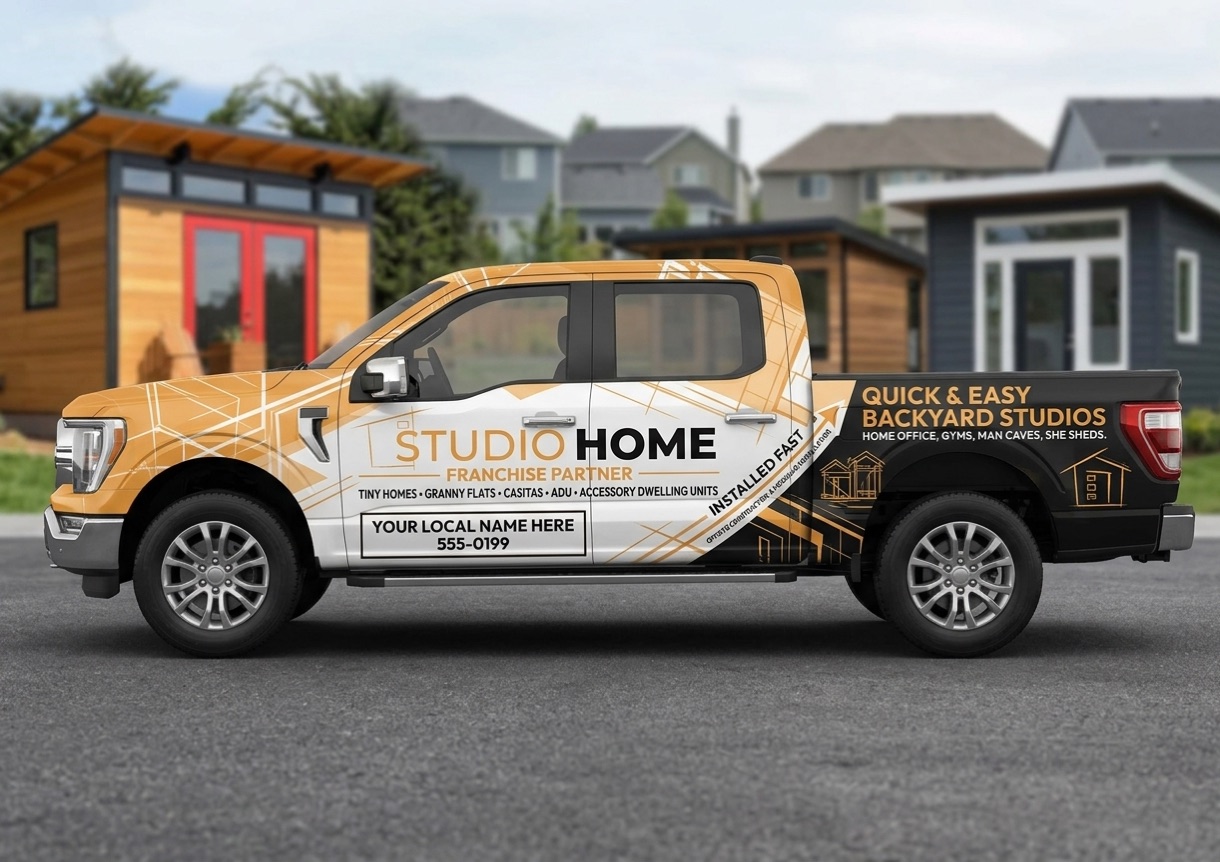
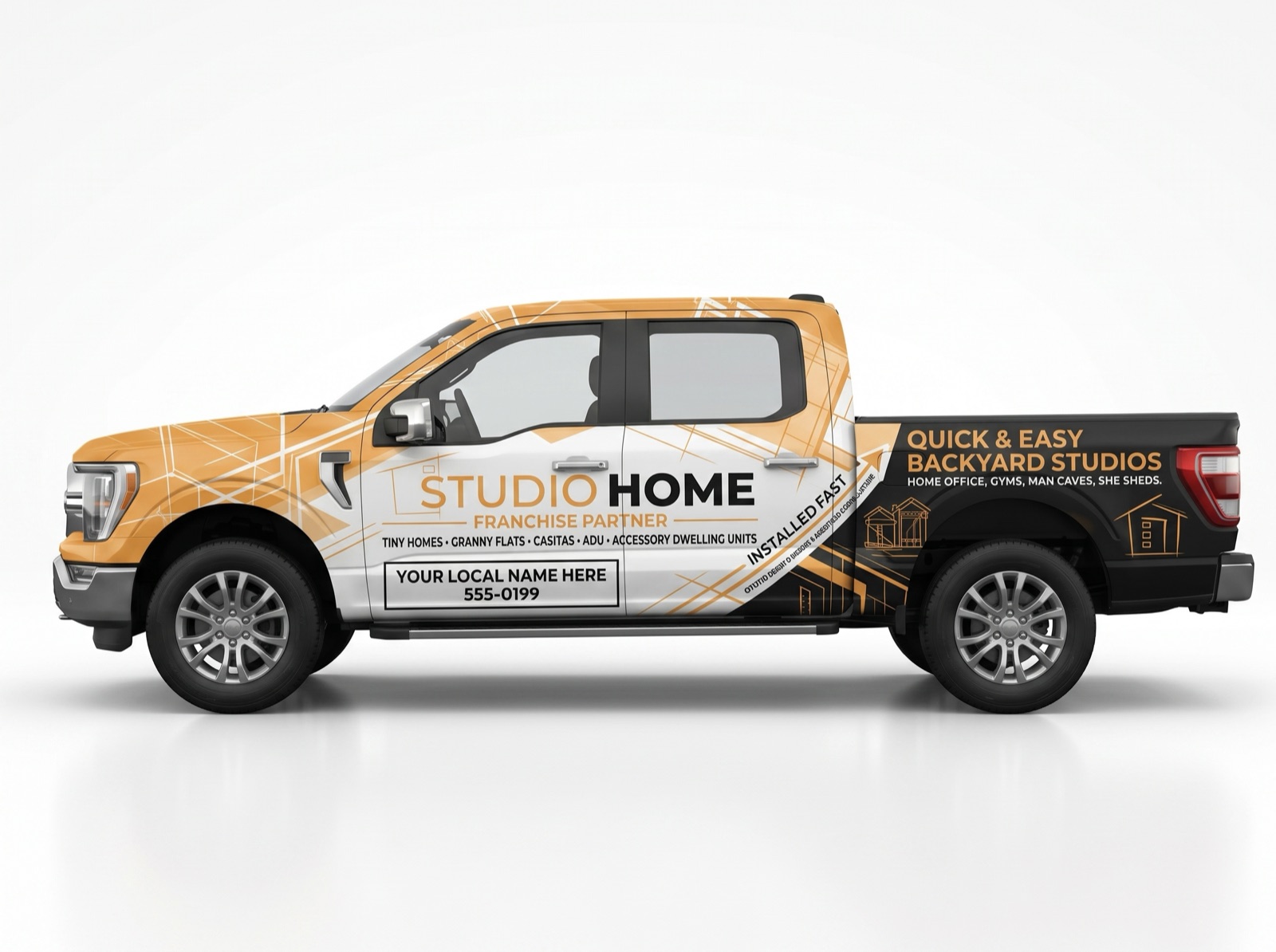
The truck is the only sign you already insure, and it works every day for five years without a media invoice. Take the vector file to your installer as issued: the white door panel is the only editable zone, and it takes your business name and local number set in Outfit — nothing else.
| Film | Cast wrap vinyl + gloss laminate |
| Coverage | Doors + bedside + tailgate (partial) |
| Editable zone | White door panel only |
| Cap height · doors | 4″ minimum |
| Cap height · bedside | 8″ minimum |
| Artwork | Vector AI at 1:1, type outlined |
| Typical cost | $3,500–$6,000 per truck |
F-250, the enclosed trailer and any cab not shown here ship as cut-line vector against your year, model and bed length. Tell HQ those three things before the installer measures. No approved design exists for them yet, so nothing is shown above rather than a stand-in.
Everything above assumes the reader is moving. These formats assume the opposite: a parent in the bleachers for two hours with nothing else in their eyeline, someone queueing at a farmers market, a spectator between innings. Dwell time, not distance, sets the copy budget — and on these placements the failure is having too little to read, not too much.
Seven words on an outfield banner wastes the best media buy in local marketing. This is the one place you are allowed a paragraph, a model list and a QR code that people genuinely have time to scan.
| Placement | Dwell | Words | QR |
|---|
Anatomy of a long-form banner
Eight zones, in the order they are read. Drop any of them and the banner reverts to a highway poster with too much text on it.
Sponsor walls specifically
Indoor panel rows follow their own rules, because you do not control the wall.
You do not open a design file. The printer swaps the text.
Every template below arrives as finished, print-ready vector art with the layout locked. You send it to the shop with three local details written in the email, and their designer makes the swap as part of the order — market line, web address, phone number. That is a normal, expected part of a print job. It is often free on a first order and rarely more than a small setup fee.
You never need Illustrator, you never need a designer on retainer, and you never need to rebuild a layout to change a phone number. If a shop wants to redesign it, there is a script for that below.
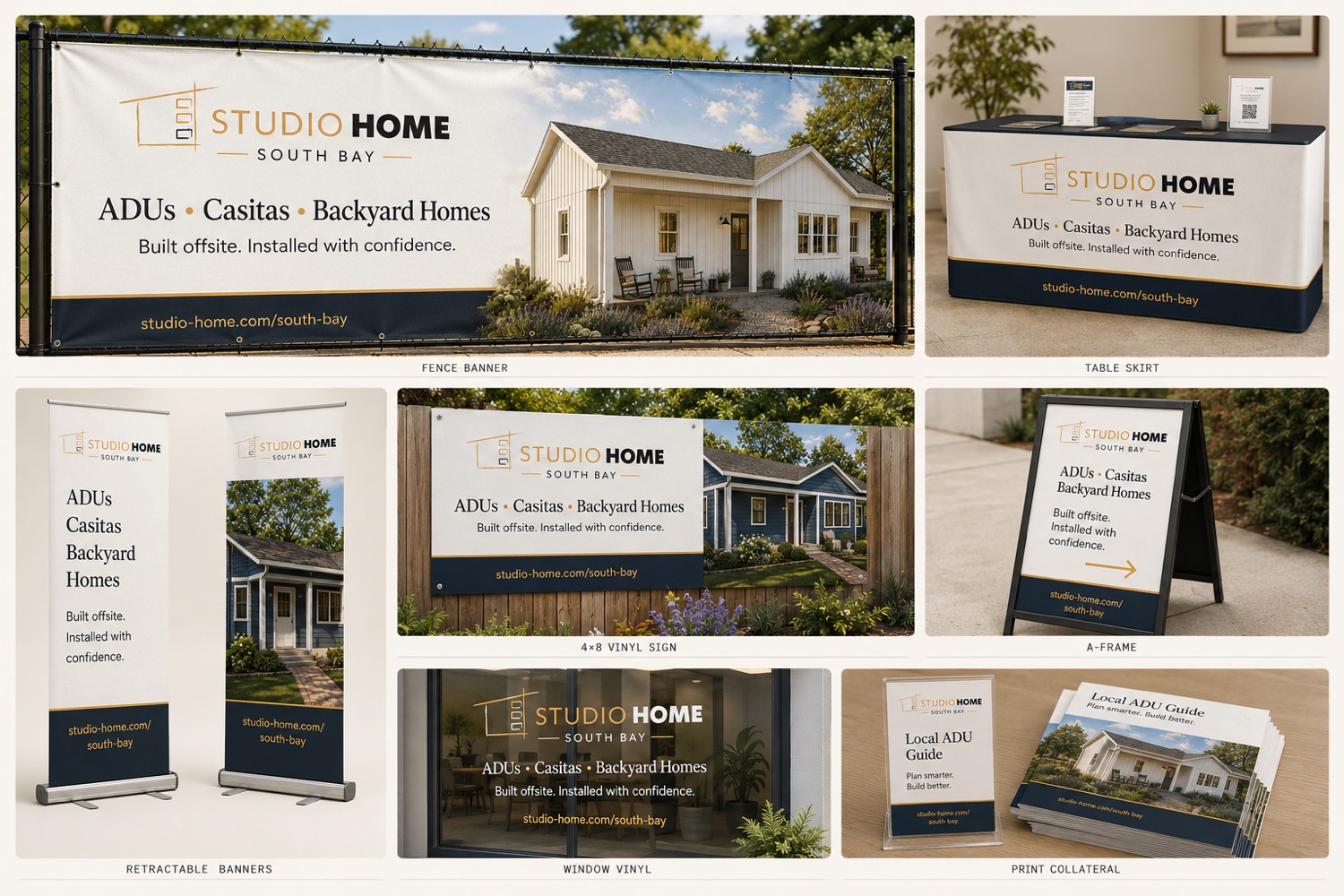
Each of these is read twice: a headline from the stands or the aisle, and supporting copy by someone who has walked closer. That is why every format below carries two minimum cap heights instead of one. The bar in each diagram is the headline height.
Template library
Long-form layouts, built and approved, with only the local fields open. In this prototype the library is listed rather than served — the released files ship from the Asset Vault.
| Template | Files | You fill in | Get it |
|---|
Two different things here, deliberately kept apart. Cut sheets and shop sheets are production simulations — dielines, panel breakdowns, trim and bleed, hex swatches — the things a wrap shop or printer needs in order to quote. Concepts are layout directions for formats we have not committed to yet.
Every sheet is a print-ready simulation and says so on its own face. None of them is a released production file — the real vector art comes from the Asset Vault.
What the printer will ask you
Have these ready and a quote takes one email instead of four.
Planning figures at low quantity, gathered to help you budget — not Studio Home pricing, and not a quote from anybody. Get three, and get them from shops that have printed a banner for a sports club before.
| Item | Typical | Note |
|---|
| Printing subtotal | $750–1,800 |
Then add the space itself. Two club season sponsorships run $600–1,600, and a market stall is priced by the day or the season on top. Budget $1,500–3,500 for a first season covering both the printing and the placements.
Then reserve for replacement, not repair. Outdoor vinyl gets one hard season in strong sun. Hold $400–900 a year to reprint what has faded and to redo anything carrying a number or a slug that has changed. Partners who skip this end up flying a bleached banner for a second season, which costs more in reputation than the reprint did in money.
Buy against confirmed placements, not in anticipation. Two formats you have somewhere to put beat a full kit in a cupboard.
Every sign carrying the mark needs sign-off before it is printed or installed. Send the proof — yard sign, banner, wrap, bulletin — to the Backyard Products Creative team and wait for the reply before it goes to the shop or the plant.
BPCreative@backyardproducts.com ↗09 · The Little ADU Library
A miniature studio on a post that hands out the permit answer
A cedar cabinet built as a small-scale Studio Home — metal roof, glazed door, two shelves — standing on your office frontage, outside a live job site, or on a busy block. Inside is one thing: a take-away booklet printed locally from an HQ template, with every model and floor plan we build, the documents and fees your city actually charges, a QR to the permit portal, your phone number and a link to save a design.
Take one. Imagine the possibilities.
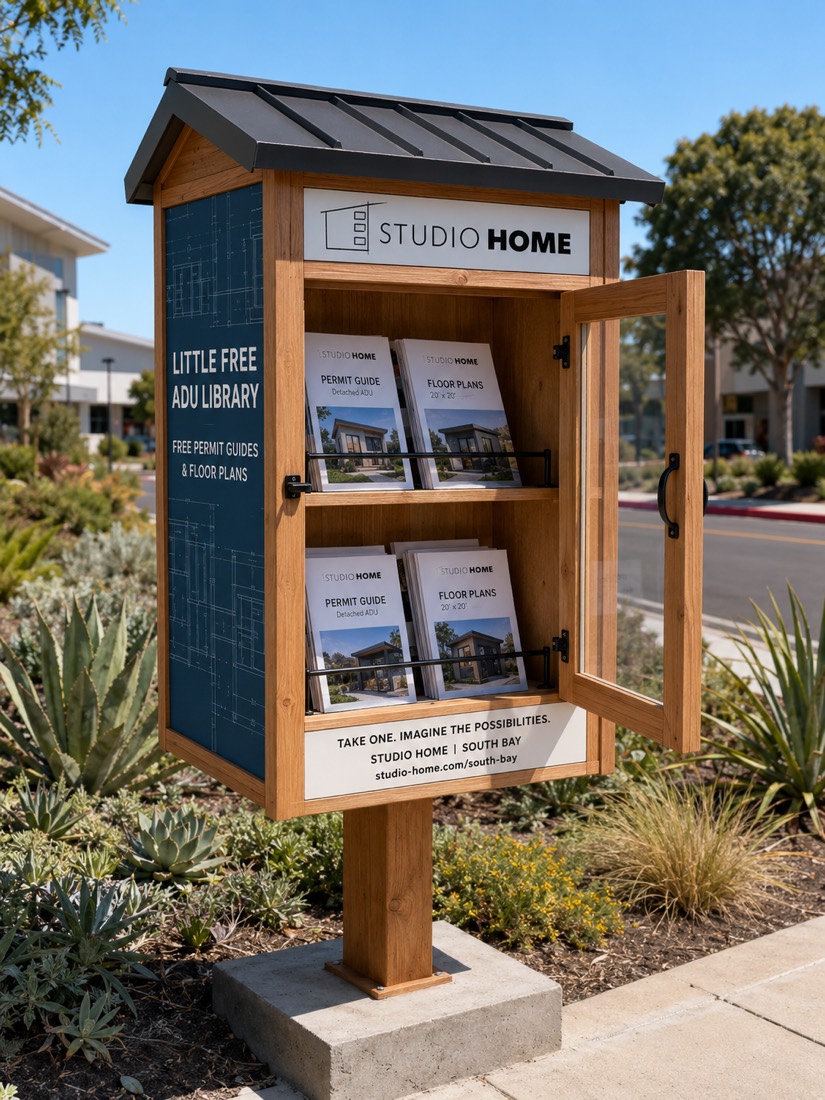
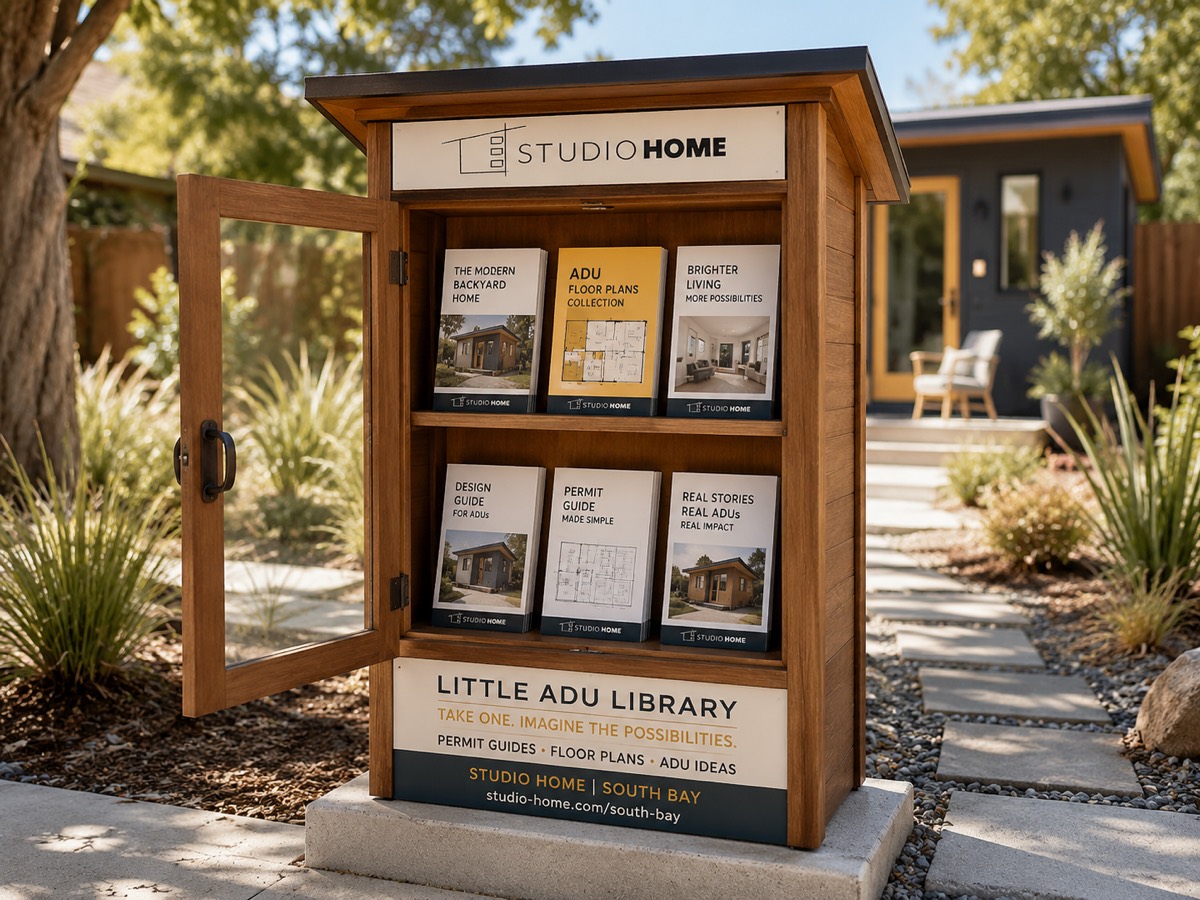
This is a structure in a public-facing place, which puts it under different rules from a yard sign. Every placement below is legitimate; each needs a different permission, and two of them need one in writing before the post goes in the ground.
Half-letter, saddle-stitched, printed by any local shop on 100# gloss text. HQ supplies the whole book; four sections are yours to fill because only you can know them. The You tag marks those.
Printing a fee table is publishing a regulatory claim
Sections 07 and 08 put your city’s document list and permit costs into print under your name and the brand’s. That is the single highest-risk page in this playbook, and it is why the standing rule is no permit, zoning or timeline promises in print. The booklet is still worth doing — but only with all five of these in place.
- Date-stamp it. “Fees current as of [month, year]” on the same spread as the table.
- Cite the source. Name the adopted fee schedule and its adoption date.
- Carry the disclaimer. Fees and requirements are set by the jurisdiction, change without notice, and must be verified at the counter before anyone budgets from them.
- Never print a duration. Describe the order of reviews. Do not print how long any of it takes.
- Take the proof to the counter. Ask the planning desk to read it before you print five hundred. It de-risks the page and it is the single best relationship call you will make this year.
| Cadence | What you do |
|---|
An unstaffed box produces no calls you can trace unless you build the trace in. Three things make it countable.
- A phone number unique to the library, different from the mailer number.
- A market URL slug on the Design Center link, so saves that originate here surface on your Signal Map as a cluster you created rather than one you found.
- A restock count every visit. Booklets taken per week is the number.
These are concept renders and boards, not released fabrication artwork. The cut list, footing detail and final panel files ship from HQ before anyone builds one. The photograph is a unit already standing in the field — it is not a Studio Home build, it is proof the format works on a verge.
10 · Asset Vault
Print-ready files, technical docs, and the specs to use them
Everything here is cleared for print, signage, vehicle and apparel use. Nothing here is cleared for paid digital placement.
| Asset | Formats | Use |
|---|
| Job | Send | Color | Resolution |
|---|---|---|---|
| EDDM postcard | PDF/X-1a, flattened | CMYK | 300 dpi @ 100% |
| Brochure / rack card | PDF/X-1a | CMYK | 300 dpi @ 100% |
| Magazine ad | PDF/X-1a to pub spec | CMYK | 300 dpi @ 100% |
| Yard sign / coroplast | Vector AI or EPS | CMYK | Vector, or 150 dpi |
| Billboard bulletin | Vector AI or 1:10 TIFF | CMYK | 150 dpi @ 10% |
| Vehicle livery | Vector AI, outlined type | CMYK + PMS | Vector at 1:1 |
| Screen-print shirt | Vector AI, separated | PMS spot | Vector |
| Embroidered hat | DST / EMB digitized | Thread match | Stitch file |
| Die-cut sticker | Vector AI + cut path | CMYK | Vector |
Three rules that prevent 90% of reprints. Bleed 1/8″ on everything trimmed. Outline all type before you send vector art — the shop does not have Outfit licensed. Never upscale a JPG for large format; ask HQ for the vector.
| Vehicle | Kit | Coverage |
|---|---|---|
| Ford F-150 | Doors + bedside + tailgate | Partial |
| Ford F-250 | Doors + bedside + tailgate | Partial |
| Chevrolet Silverado HD | Doors + bedside + tailgate | Partial |
| RAM 2500 | Doors + bedside + tailgate | Partial |
| Enclosed trailer | Full flank + rear | Full |
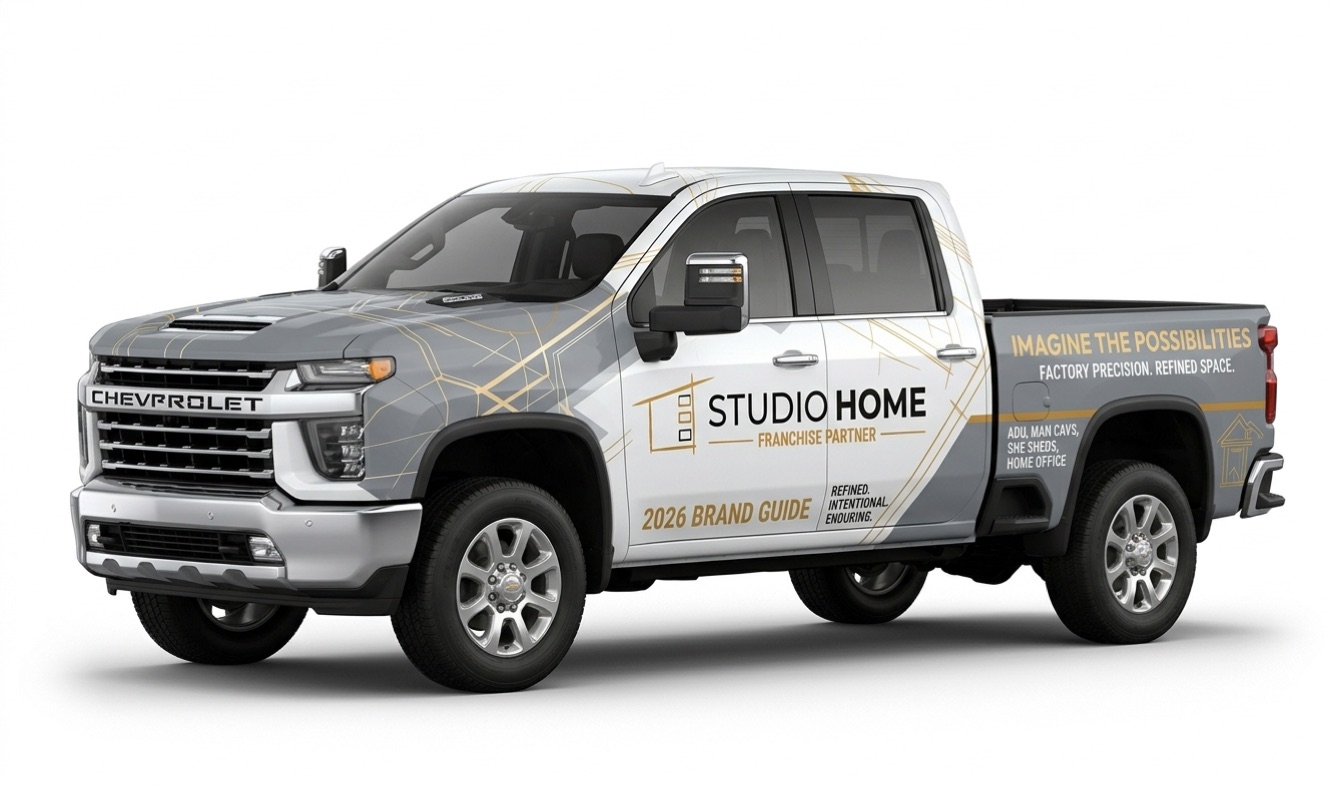
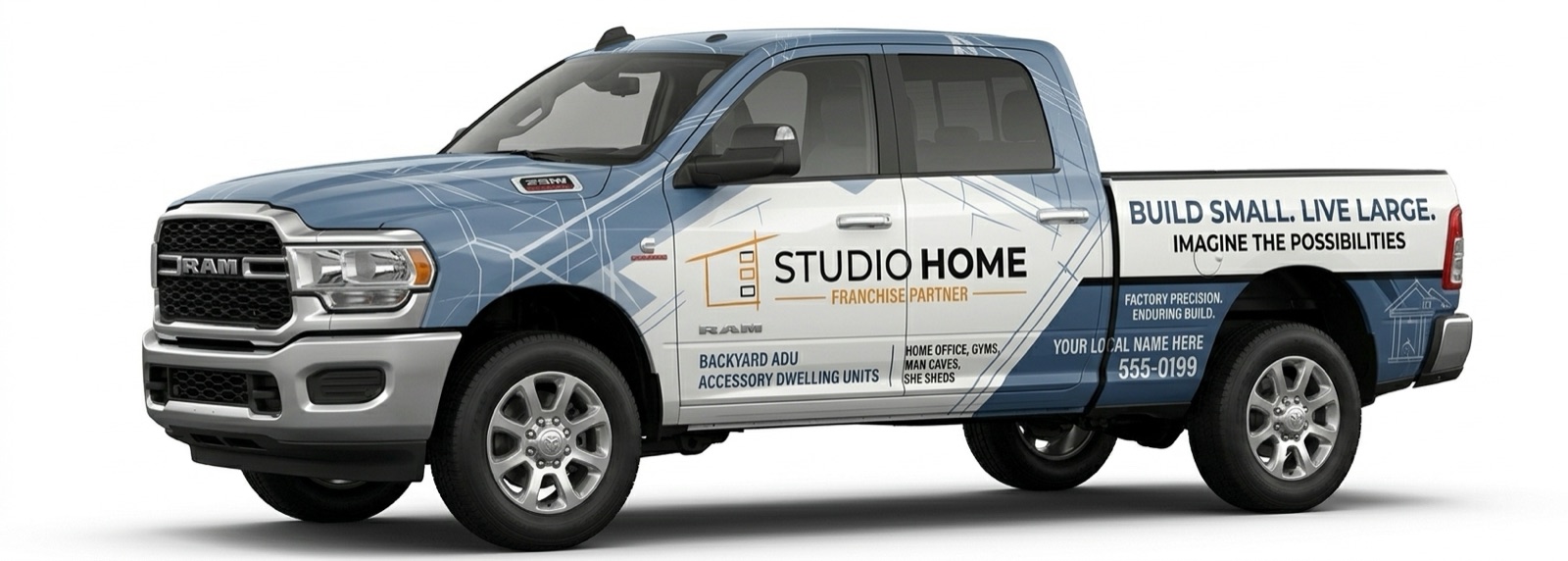
Four approved wrap designs are live in the gallery below. Cut-line vector for your specific cab and bed length ships with the kit — tell HQ the year, model and bed before the installer measures.
Hand the vector file to your installer as issued. The white door panel is the only editable zone — your business name and local number, set in Outfit, and nothing else. Topaz and Noir over Canvas or Blueprint; no other palette is approved for vehicles.
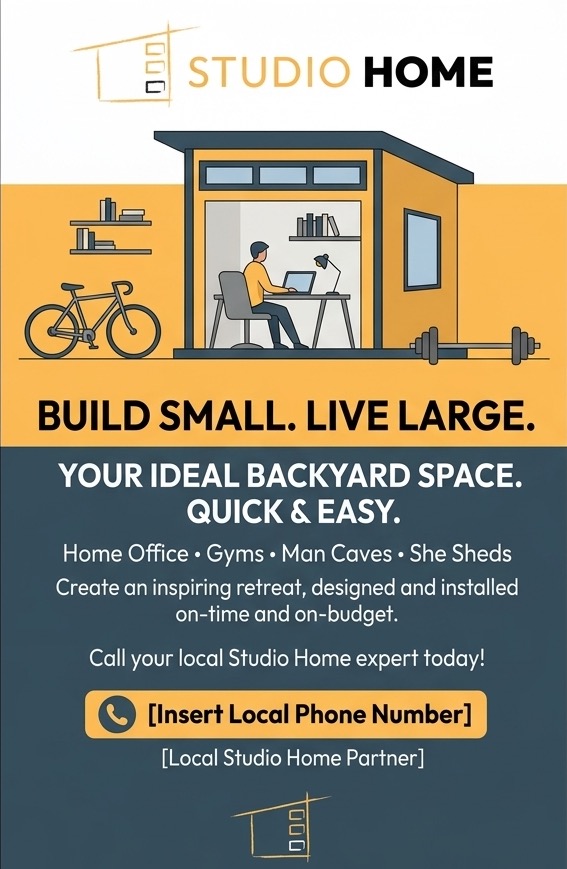
Two sanctioned directions. Fill the phone field and the partner line, then send it straight to the printer — the indicia block and address panel are already positioned for the EDDM rate.
Six elevations, each rendered in a different landscape. Pick by where it looks native before you pick by which one you like — an ad only reads as local if the siding, the planting and the horizon match the market it lands in. A mountain-and-pines image in a Gulf-coast mailer is the fastest way to look like a national advertiser.
These are product renders in environment, which is what the Brand Guide calls product lifestyle imagery. They are not photographs of a completed build — for that, use your own release-cleared project photography, which will always outperform a render locally.
| Print job | At final size |
|---|
Native is 10″ × 6.67″ at 300 dpi. Never upscale one of these for large format — ask HQ for the large-format source instead.
One elevation per piece. Mixing two finishes in a single ad reads as a catalogue rather than a neighbour. If you need to show range, show one building and list the rest as words.
Colour
Two iconic hues carry the brand: orange and black. Everything else is support.
Topaz#FDBE57 · primary
Canvas#FFFFFF · primary
Noir#000000 · primary
Blueprint#364F5F · secondary
Soft Stone#F5F5F5 · secondary
Hard Stone#666666 · secondary
Photography
One style only: product lifestyle. The building sits in a real yard, in use, with enough context that a homeowner recognises their own back garden. No studio cut-outs, no empty renders, no stock families.
Typography
Outfit, everywhere. It ships in the brand package — install it before you open a template.
The logo
Shed-profile icon left of the wordmark, horizontal, always. Single-colour use is black or white — nothing else.
| Never | Because |
|---|---|
| Rotate or stack it | Lockup is horizontal only |
| Stretch or distort it | Proportions are fixed |
| Drop-shadow or outline it | No effects, ever |
| Reset the wordmark | It is drawn type, not a font you have |
| Recolour it | Approved colourways only |
Everything carrying the mark needs sign-off before it runs. Mailers, signage, vehicle wraps, apparel, magazine ads — send the proof to the Backyard Products Creative team and wait for the reply before you send it to a printer or an installer.
BPCreative@backyardproducts.com ↗Not in this vault
Story and Reel templates, paid-social ad creative, display banners and PPC assets are produced and deployed by HQ only. Requesting them opens a ticket that will be closed with a link to the Line of Scrimmage.